
Monday, 7 pm, someone posts the poll: who's in for a scrim on Thursday at 9? Three thumbs up, one maybe, and one player who never opens the channel. On Thursday at 8:55 the scrim is cancelled, and the same poll goes up the following Monday.
The problem isn't motivation, it's the format. A poll asks five people to say yes or no to a time somebody picked in advance. Finding a slot works the other way around: everyone says when they're free, and the slot comes out of the overlap.
This Feature focus starts with the method, which works with any tool, then shows how the HexCore calendar runs it, from availability to game day.
Why Discord availability polls fail
Polls, reactions under a message, a shared spreadsheet: they all break in the same places.
- They only test the slot someone proposed. If Thursday at 9 doesn't work but Wednesday at 8 would have worked for all five, nobody will ever know.
- Silence means nothing. A player who hasn't answered may be busy, away, or may simply not have seen the message.
- They count heads, not roles. Five yes votes with two junglers and no support is not a team.
- Maybe gets read as yes when it suits you and as no when it doesn't, and nobody remembers which slot depended on it.
- Nothing carries over. Most players have the same evenings free week after week, and they still answer from scratch every Monday.
Three rules for a slot that actually holds
1. Count roles, not heads
A slot holds when every lane is covered: five starters, or a substitute standing in for a specific starter. Count availability lane by lane and you see at once whether you need a sub, a pick-up or another evening.
2. Size the window to the session
A slot is only useful if the whole session fits in it. Count roughly an hour per game, lobby and draft included: one game needs an hour, a BO3 about three. Two overlapping hours are not enough for a BO3, however many players are in.
3. Collect time ranges, compute the overlap
Ask each player for the time ranges when they're free, not for a yes or a no. The common slot is then calculated, not voted on. Keep maybe as an answer of its own: a slot that only works if a maybe turns up is a slot to confirm before you book an opponent.
One last rule, less obvious: an absence is an answer. A player who is away for the week should be able to say it once, so the team stops waiting for them and stops chasing them.
A weekly routine that takes five minutes
The method only works if it runs every week without anyone having to push. Here is a routine that holds:
| When | Who | What |
|---|---|---|
| Before the weekend | Each player | Fills in next week's availability, or says they're away |
| Friday | Captain | Chases whoever hasn't answered, by name |
| Once the five starters have answered | Captain | Reads the best slots and books the sessions |
| Same day | Captain | Sends the opponent one message: date, time, format, draft, lobby |
| Game day | Everyone | Gets a reminder with the lineup and the links |
Before the weekend
- Who
- Each player
- What
- Fills in next week's availability, or says they're away
Friday
- Who
- Captain
- What
- Chases whoever hasn't answered, by name
Once the five starters have answered
- Who
- Captain
- What
- Reads the best slots and books the sessions
Same day
- Who
- Captain
- What
- Sends the opponent one message: date, time, format, draft, lobby
Game day
- Who
- Everyone
- What
- Gets a reminder with the lineup and the links
With a spreadsheet, the captain does every step by hand: reading the overlap, chasing, writing the message. That is exactly the part worth automating.
Feature focus: the HexCore calendar
On HexCore, this routine runs in the calendar. Players fill it in on the site, the Team view computes the slots, and the Discord bot does the chasing.
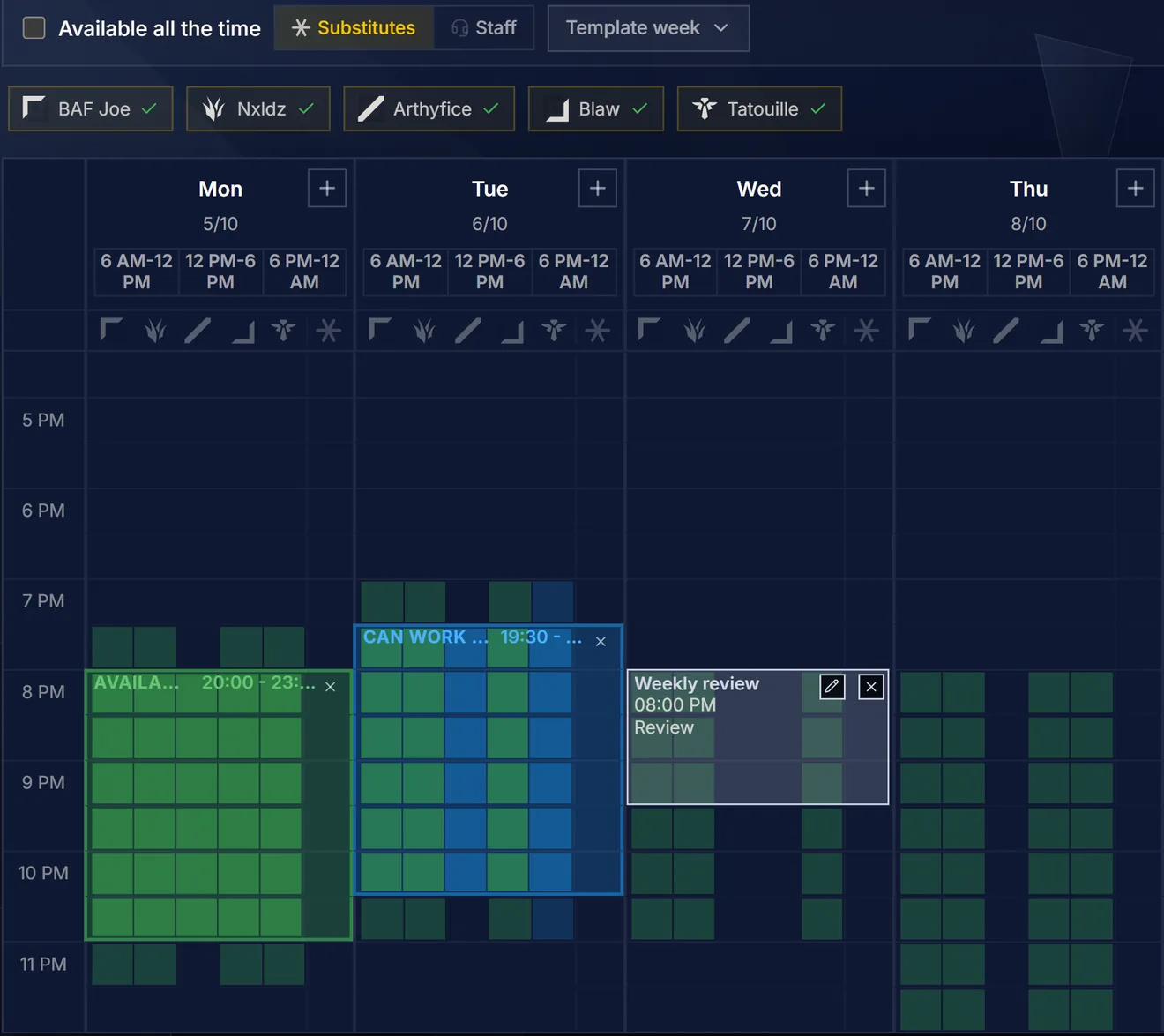
Each player paints their week
In the My availability view, a player drags across the grid to create a time range, then clicks it to switch between Available and Can work it out. Buttons fill a whole morning, afternoon or evening at once, and the list view does the same on mobile, day by day.
A template week stores the usual evenings: applied in one click, it fills the whole week. A player who is away clicks Not available this week: the team sees it, and the bot stops reminding them.
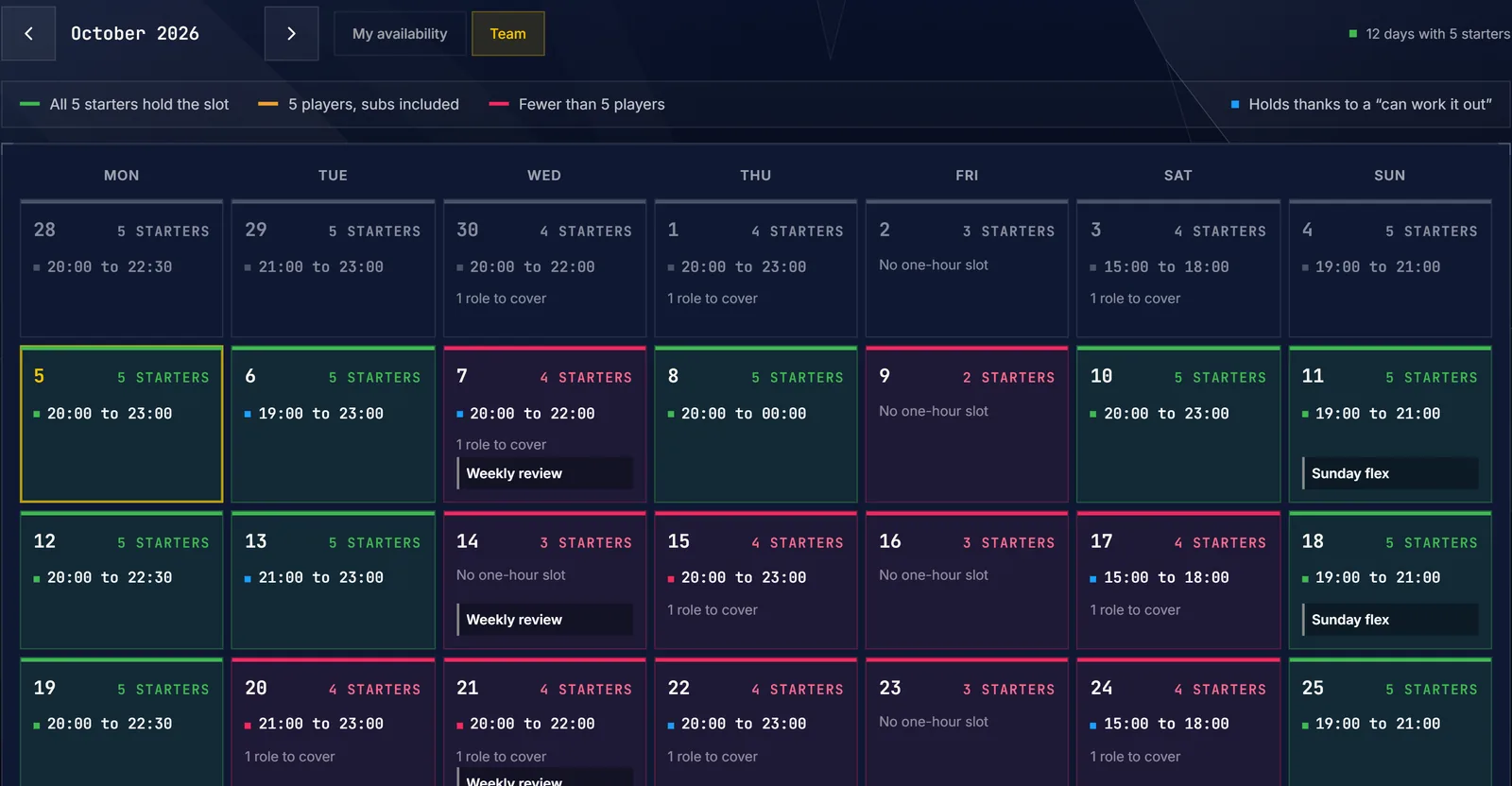
The Team view reads the month in three colors
The Team view applies the three rules to every day of the month:
- Green: all five starters hold the slot.
- Amber: five players are there, substitutes included.
- Red: fewer than five players.
Color never carries the information alone. Each day shows its count (5 STARTERS, 4+1) and its best slot, the longest stretch that holds for at least an hour. A blue marker flags a slot that only holds thanks to a Can work it out. A red day still shows its best four-player slot, with the number of roles left to cover.
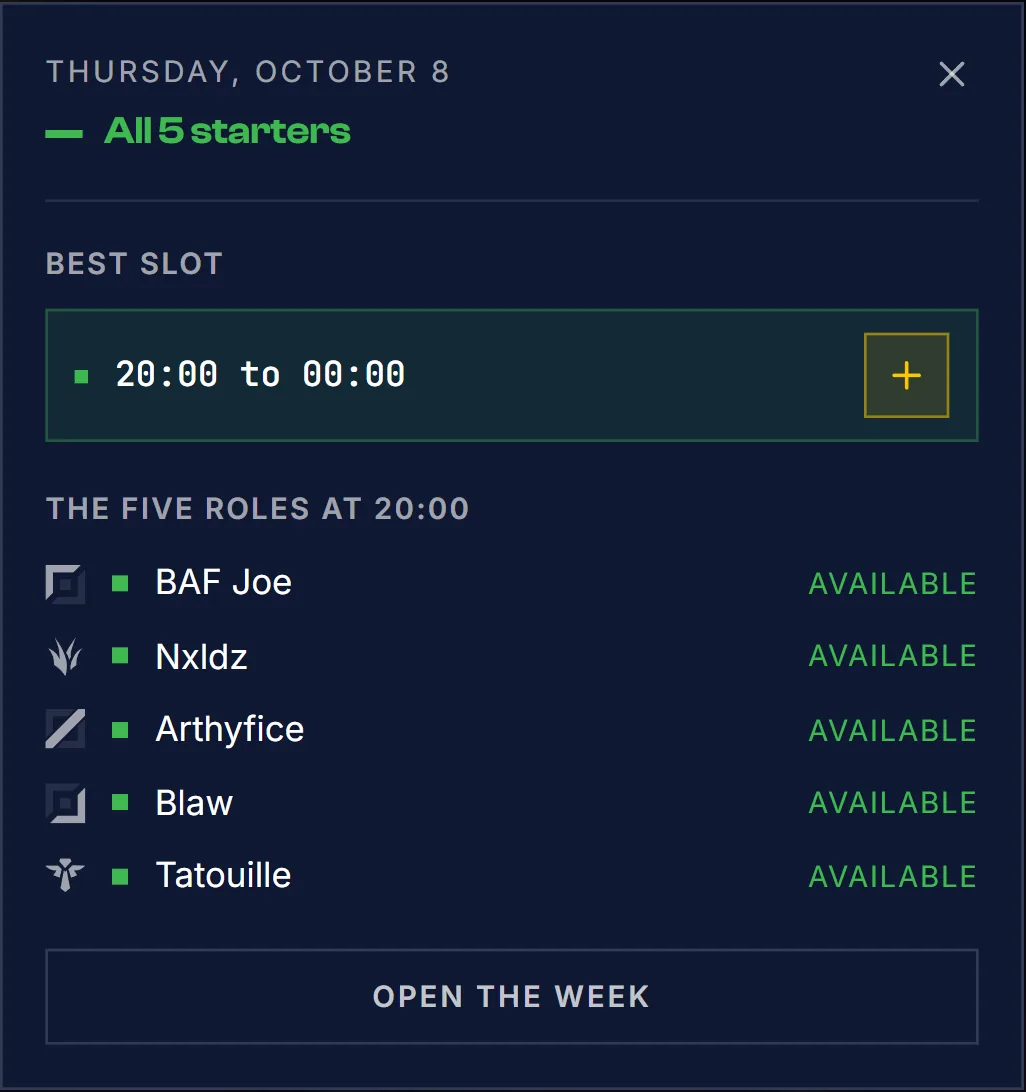
Clicking a day opens its details: the best slot, the five roles at that time with each player's status, and the events already planned that day.
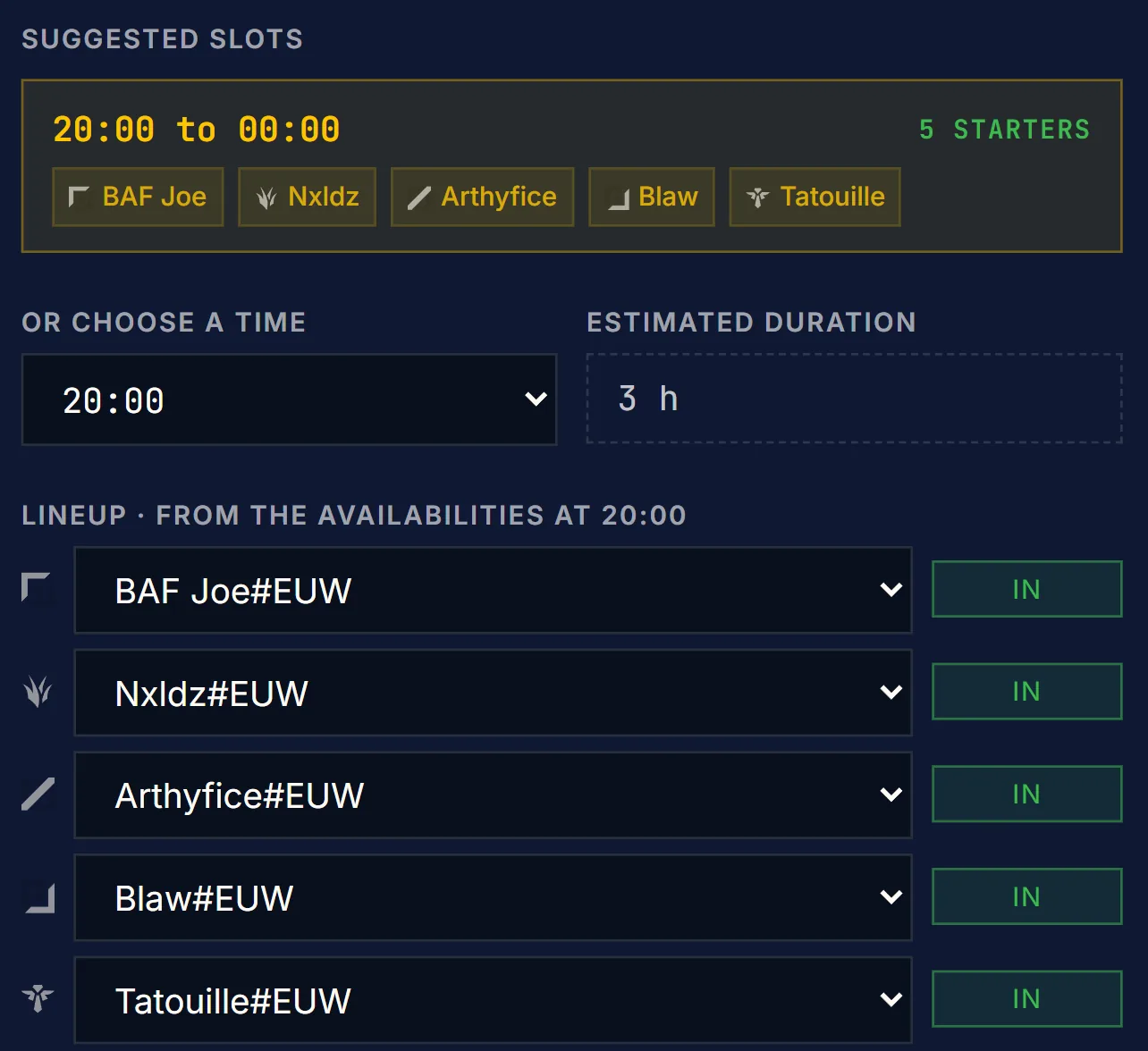
The event is created on the slot
The + next to the best slot opens event creation already set to that time. Pick the type (Scrim, Flex, Tournament, Ranked 5v5, Review or Custom) and the number of games: the estimated duration follows, and the suggested slots list the windows long enough for it, with the number of starters each one holds.
The lineup is filled in from the availability at the chosen time, lane by lane, with each player's status. An empty role can go to a pick-up, entered by Riot ID.
One message for the opponent
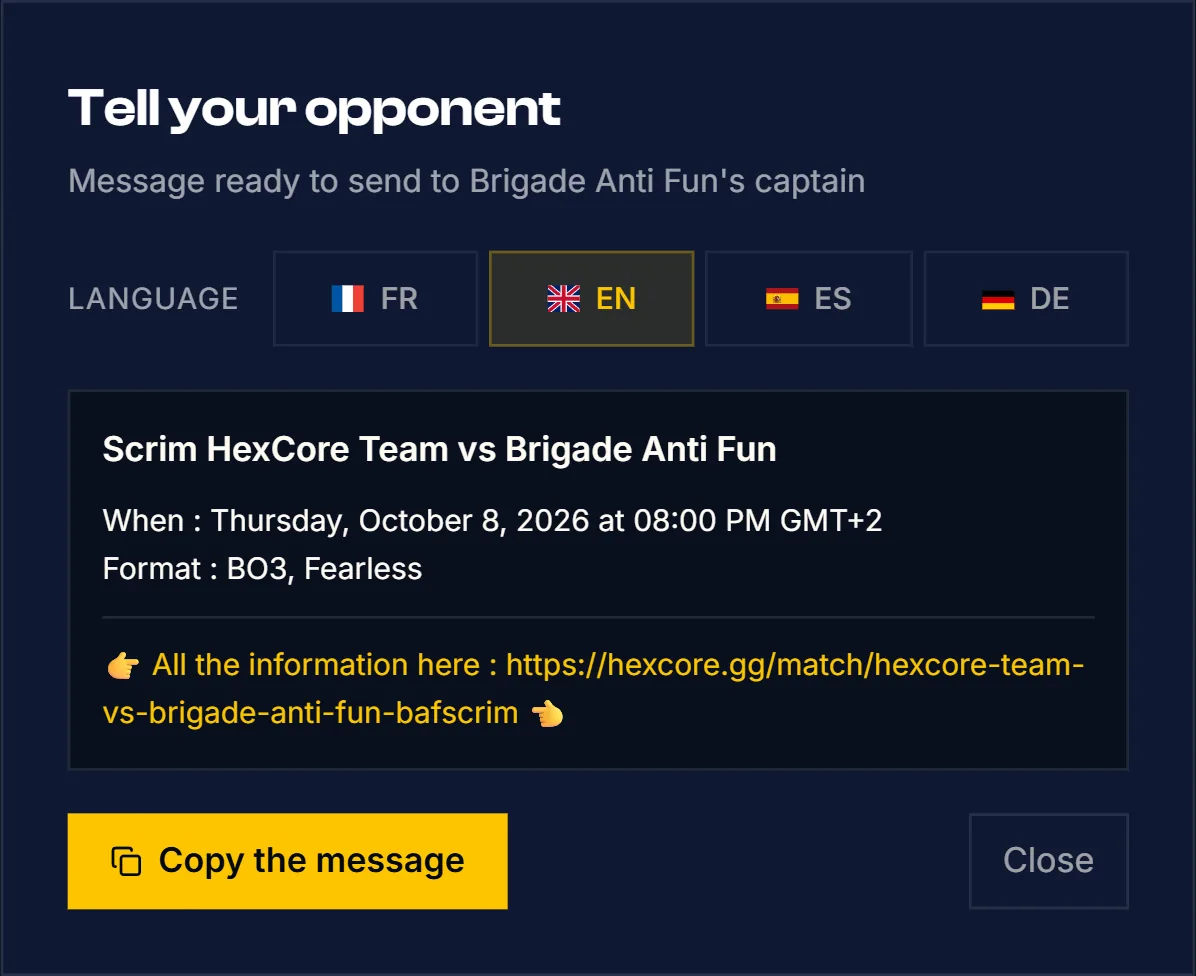
Once the scrim is created, HexCore writes the message for the other captain: date, time, format and the link to the match page, in English, French, Spanish or German. One click copies it.
If the other team uses HexCore too, they paste that link into Import a match: the scrim lands in their calendar, with the same Drafter.
Discord does the chasing
The reminders of the routine run from the team's Discord server:
- Every Friday, a message lists the players who haven't filled in next week's availability. It can be turned off in the team settings.
- In the Team view, Remind pings on Discord the players still missing for the current week.
- Once the five starters have answered, the bot posts the best slots of the week, with a button to create the session. Slots already taken by an event are left out.
- When no session is planned at all, the bot sends a reminder four hours before a slot that brings at least four players together.
- Each event is announced with its lineup and, when they are set, the Drafter link and the opponent's OP.GG. Game day gets its own reminder.
Getting started
The calendar, availability, the Team view and the Discord reminders are part of the free plan. Link your Discord server, ask each player to fill in one week or a template week, and the bot posts your first best slots as soon as the five starters have answered.
The Monday poll can go. The captain's job comes down to reading the colors and clicking +.